
Typographic Attack & AI Image Detector – QR, Link and Text Check
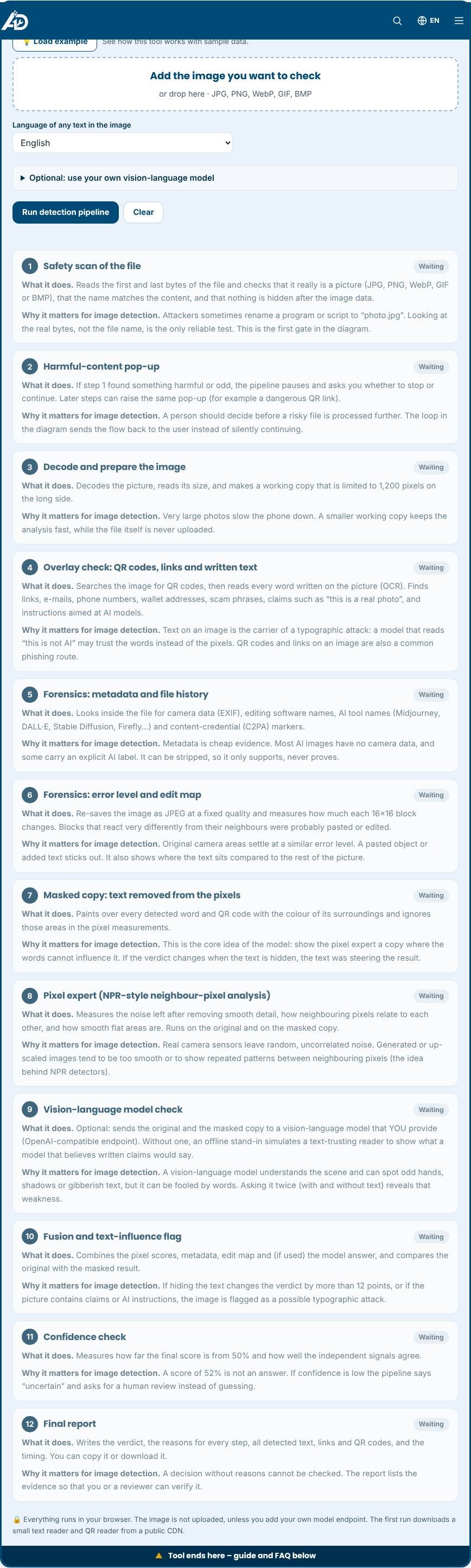
This tool follows a 12-step safety and AI-detection pipeline. It checks that the file is really an image, reads QR codes and every word on the picture, tests links for scam signs, looks at metadata and edits, hides the text and measures the pixels again, and tells you if written words are steering the result.
Loading tool…
How to use the Typographic Attack & AI Image Detector
-
1
Step 1
Add the image you want to check (or press “Load example”).
Typographic Attack & AI Image Detector – Step 1 -
2
Step 2
Choose the language of any text in the picture; optionally add your own vision-language model.
-
3
Step 3
Press “Run detection pipeline” and watch each of the 12 steps fill in with its result and reason.
-
4
Step 4
Read the final report, then copy, download or print it.
What is a typographic attack?
A typographic attack is a trick that uses written words to fool an AI model. Someone puts a sentence on a picture, such as “this is a real photo”, “not AI generated” or even “ignore your previous instructions”, and a vision-language model (VLM), which reads text and looks at pixels at the same time, may trust the words instead of the evidence. The same space on a picture can also carry a QR code or a link that leads to a scam page. This tool checks all of that in one place. It finds QR codes, links and any text written on the image, tests whether the words try to influence a model, and gives an estimate of whether the picture itself looks AI-made.
The 12-step pipeline, in plain words
Every step shows what it does, why it matters for image detection and what it found. First a safety scan reads the real bytes of the file, and a pop-up lets you stop if something harmful appears. Then the image is decoded and the overlay check looks for QR codes, links and every written word. Metadata and error-level forensics look for camera data, AI tool names and pasted areas. A masked copy hides the text, the pixel expert and an optional vision-language model judge it, and fusion compares the results. A confidence check says “uncertain” when evidence is weak, and the final report lists every reason.
Why hide the text and test again?
This is the core idea of the diagram. If a detector gives 85 percent AI on the original picture but 40 percent when the words are painted over, the words were doing the talking, not the pixels. By running the pixel expert on a masked copy, the tool measures how much the text influenced the answer. A difference of 12 points or more raises the typographic-attack flag. Instruction-like phrases and claims about being real or fake raise it as well.
QR codes and links
Every QR code is decoded in your browser and labelled: web link, Wi-Fi login, contact card, phone or SMS, payment or crypto address. Links, from QR codes or text, are checked for scam signs such as an @ sign hiding the target, raw IP addresses, look-alike brand names, shorteners, risky endings and program downloads. Only the address is checked, not the live site.
How image detection reasons work
Real photos carry random sensor noise. Generated or smoothed pictures often have less noise, flat areas that are too clean and neighbouring pixels that are too similar. The pixel expert measures these and gives an estimate. Metadata and the edit map add hints. None is proof alone, so the tool combines them and reports its confidence.
Using your own vision-language model
Open the optional box, enter an OpenAI-compatible endpoint, a key and a model name. The tool sends the original and the masked copy and compares the two answers. Your key stays only in the page and is never stored. Many providers block direct browser requests; if yours does, the step is skipped safely and the offline stand-in is used.
Tips for better results
Use the original file, not a screenshot of a screenshot, and choose the right language. Treat 40 to 60 percent as “uncertain”.
Privacy and speed
The image is processed in your browser and is not uploaded. The text reader and QR reader are downloaded only when you press the button, so the page loads fast. Related tools: the Overlay Text Detector, the AI Content Detector for written text and the Text Overlay Generator. Need a custom detection tool? See custom tool development.
Who is it for?
Journalists, moderators, sellers, teachers and anyone who receives pictures with QR codes, links or claims such as “this photo is real” and wants to know if they can be trusted.
Why use it
- Works in your browser – files are not uploaded
- No signup, no watermark
- Fast on phone, tablet and desktop
- Download in common formats (PNG, JPG, WebP)
Frequently asked questions
Is the result proof that an image is AI-made?
No. It is an estimate from simple image statistics, metadata and edit traces. Use it as one signal and confirm important cases another way.
Is my image uploaded?
No. All checks run in your browser. Only if you add your own model endpoint is the picture sent to that provider.
What is a typographic attack?
Words written on a picture that try to make an AI model believe or do something, for example “this is a real photo” or “ignore your instructions”.
Is the result proof that an image is AI-made?
No. It is an estimate from image statistics, metadata and edit traces. Use it as one signal.
Does it work without internet?
The pixel, metadata and edit-map steps do. The text reader and QR fallback reader download once from a CDN.
Why does it say uncertain?
When the score is near 50 percent or the signals disagree, a clear answer would be a guess, so it asks for a human review.
Is my image uploaded?
No, unless you add your own model endpoint, which then receives the picture.