
Product Image Mockup Generator – Mockups for Prints and Digital Products
A product mockup shows your design on a real-looking item such as a poster frame, mug or t‑shirt. It helps buyers imagine the product and lifts the quality of your listing photos.
Loading tool…
How to use the Product Image Mockup Generator
-
1
Step 1
Upload your design as PNG or JPG.
Product Image Mockup Generator – Step 1 -
2
Step 2
Pick a mockup scene such as a frame, mug, tote bag or phone screen.
-
3
Step 3
Adjust position and size so the design fits naturally.
-
4
Step 4
Download the image and add it to your listing as one of the photos.
What is a product mockup?
A mockup shows your design on a real-looking product, such as a T-shirt, a mug, a framed print or a tote bag. Buyers cannot touch an online product, so a good mockup helps them imagine owning it. Print-on-demand sellers, artists, designers and Etsy shop owners rely on mockups for listing photos. This free generator places your design onto seven scenes: T-shirt, coffee mug, framed print, canvas print, tote bag, sticker sheet and a clean poster on a wall. It creates square 1500 by 1500 pixel images that you can download in one click.
How to use the mockup generator
- Upload your design. A PNG with a transparent background gives the best result because the product colour shows through.
- Choose a scene from the list.
- Pick the product or frame colour and the background colour to match your brand.
- Adjust the design size and move it up or down until it looks balanced.
- Download the image, or download all scenes in one go.
Tips for professional-looking mockups
- Use a high-resolution design. Low-resolution artwork looks blurry when enlarged.
- Keep a margin around the design. Designs that touch the edge of a product look cramped.
- Choose product colours that contrast with the artwork, for example a light design on a dark T-shirt.
- Use the same background colour across all listing photos for a consistent shop look.
- Combine mockups with real photos if you offer physical products. Buyers trust photos of the real item.
- Show several scenes in one listing so buyers see how the artwork works on different products.
What makes a good listing image set
Marketplaces such as Etsy let you add several photos. A strong set includes a main image that is clear at thumbnail size, a lifestyle or scene image, a close-up, a size guide and an image that explains what the buyer receives. For digital downloads, show the printable at several sizes and in a frame so buyers can imagine it on their wall.
Common mistakes to avoid
- Using a design that you do not own or have a licence for. Mockups do not change copyright.
- Misleading buyers. Make sure the mockup does not suggest a product feature you do not offer, such as a different material or size.
- Forgetting to describe the real item in the listing text.
- Using a white design on a white product, which disappears.
Privacy and limits
The mockups are drawn on your device with simple scene shapes and shading, so they are stylised illustrations and not photographs. They are meant for quick previews and listing images, not for photo-realistic advertising. Your design file is not uploaded. Always check how the product looks when it is printed, because real fabric and print methods can change colours.
Variations and the T-shirt option
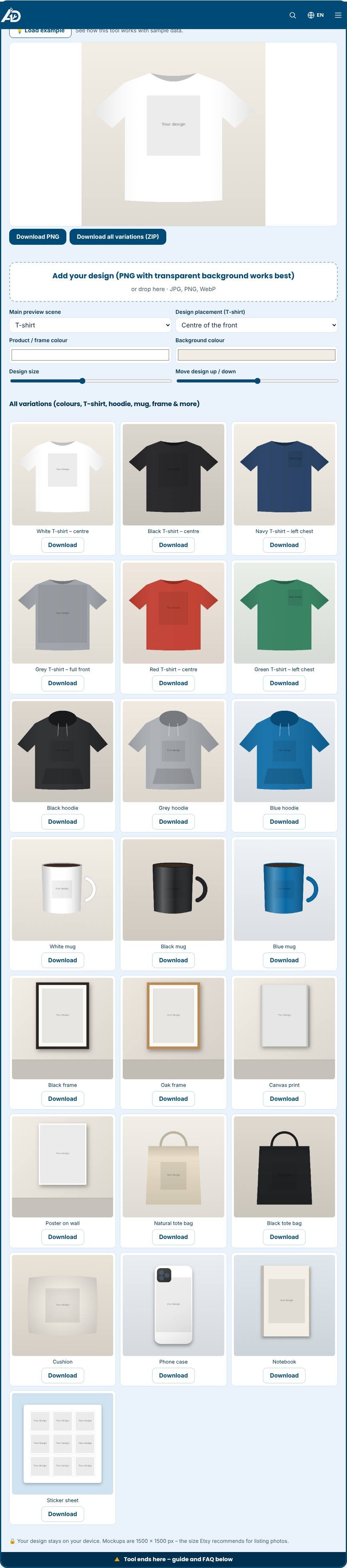
Below the preview the tool shows every variation at once: white, black, navy, grey, red and green T-shirts, hoodies, mugs, framed prints, a canvas, a poster, tote bags, a cushion, a phone case, a notebook and a sticker sheet. For T-shirts choose where the design goes: the centre of the front, the small left chest area for logos, or a large full-front print. Each preview has its own Download button, and Download all variations (ZIP) saves the whole set in one file, ready for your Etsy or Shopify listing. The previews update when you change the design size, position or background colour.
Related tools
Create printable products with the Etsy Digital Product Generator, make a promo video with the Product Video Generator, and write your listing with the Etsy Listing Generator.
Who is it for?
Print-on-demand and digital sellers who need listing images without a photo shoot.
Why use it
- Listing titles, tags and descriptions in one place
- Mockups and video ideas for better listing photos
- Made for handmade, print-on-demand and digital sellers
- Free to start
Frequently asked questions
How many images should a listing have?
Use as many as the marketplace allows. Show the product, size, details and use in a room or scene.
What image size is best?
Etsy recommends at least 2000 pixels on the shortest side for sharp zoomed photos.
Can I use mockups commercially?
Check the licence of each mockup scene. Scenes made by this tool are free to use for your listings.
Which file type is best for my design?
A PNG with a transparent background. JPG works too, but its background will show as a coloured rectangle.
What size are the mockup images?
1500 by 1500 pixels, a good size for marketplace and social media listing photos.
Can I use the mockups commercially?
Yes, the scene shapes are generated by the tool. You are responsible for having the rights to the design you place on them.
Always follow Etsy’s current seller policies, including its rules on AI-assisted content and digital items.