
Email Deliverability Checker – SPF, DKIM, DMARC and Spam Score
Email deliverability is whether your messages reach the inbox instead of spam. It depends on authentication (SPF, DKIM and DMARC), sender reputation and content. Use the checklist below to find and fix the most common problems.
Loading tool…
How to use the Email Deliverability Checker
-
1
Step 1
Enter your sending domain.
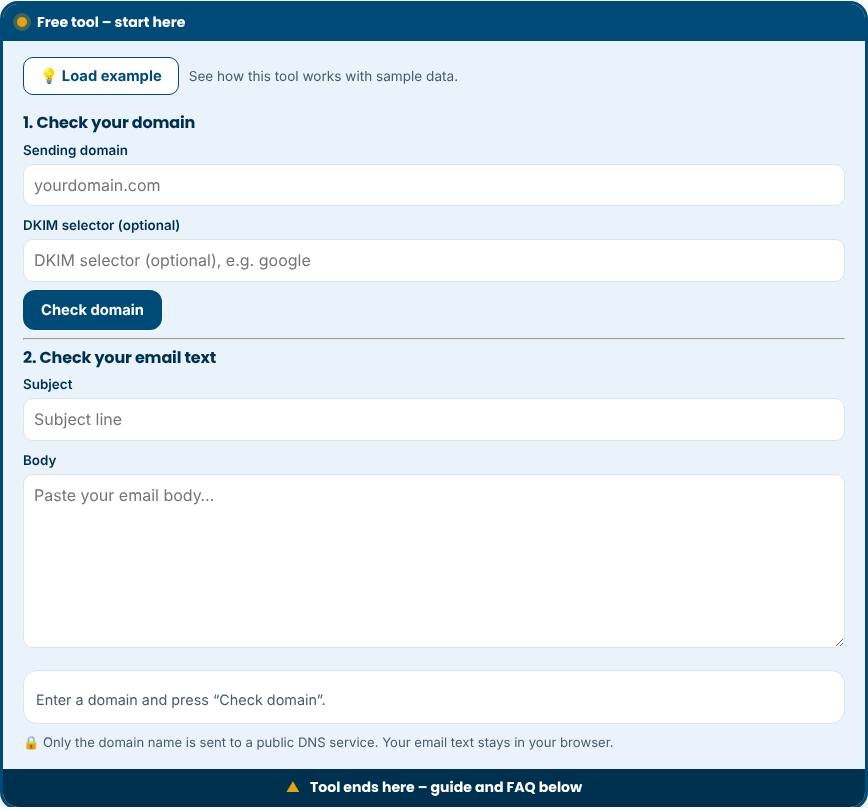
Email Deliverability Checker – Step 1 -
2
Step 2
Check that SPF, DKIM and DMARC records exist and are valid.
-
3
Step 3
Review your subject line and content for spam triggers.
-
4
Step 4
Fix the issues listed, then send a test to a few real inboxes.
What is email deliverability?
Email deliverability is the ability of your messages to reach the inbox instead of the spam folder or being rejected. It depends on technical setup, your sending reputation and the content of your emails. Three DNS records are especially important: SPF, DKIM and DMARC. Since 2024, large providers such as Gmail and Yahoo require bulk senders to authenticate their mail with these standards. This tool checks your domain's records live and grades your setup, then lets you check an email subject and body for common spam signals.
What the checker tests
- MX records: show where mail for your domain is received.
- SPF: lists the servers allowed to send email for your domain. It should end with a policy such as -all or ~all.
- DKIM: adds a digital signature to your messages. The tool looks for keys on common selector names or on a selector you enter.
- DMARC: tells receivers what to do with mail that fails SPF and DKIM and where to send reports.
- MTA-STS and BIMI: optional records that improve security and brand display.
How the checks work
The tool sends DNS queries through a public DNS-over-HTTPS service and reads the records it gets back. No mail is sent, and the checker does not need access to your email account. Only the domain name leaves your browser. The email content check runs entirely on your device and looks for spam trigger words, excessive capitals or punctuation, too many links, missing unsubscribe text and very short messages with links.
How to fix common problems
- No SPF record: add a TXT record that includes your email provider, for example "v=spf1 include:provider.example -all".
- More than one SPF record: merge them into one. Multiple records cause SPF to fail.
- No DKIM: enable DKIM in your email service and publish the key it gives you.
- No DMARC: publish a TXT record at _dmarc with p=none and a reporting address, then move to quarantine and reject once reports look clean.
- Too many lookups: SPF allows ten DNS lookups. Remove unused includes.
Tips for staying out of spam
- Send only to people who agreed to hear from you and make unsubscribing easy.
- Keep your list clean by removing bounced and inactive addresses.
- Warm up new domains by sending small volumes first.
- Use a consistent From name and a real reply address.
- Avoid misleading subject lines and use a plain, helpful tone.
- Monitor complaint rates and aim to keep them very low.
Common mistakes to avoid
- Sending marketing email from a free mailbox address.
- Publishing DMARC with a strict policy before all your senders are authenticated.
- Forgetting third-party tools such as invoicing, CRM and newsletter services that send mail on your behalf.
- Assuming a good grade guarantees inbox placement. Reputation and content also matter.
Privacy and limits
The tool tests public DNS records only. It cannot see your sender reputation, blocklists, engagement or spam folder placement. DKIM can use any selector name, so a missing key on common selectors does not prove that DKIM is not set up. Enter your provider's selector for an exact check.
Related tools
Measure results with the Email Marketing ROI Calculator, improve your subject lines with the AI Marketing Toolkit, and check your site with the Website Security Scanner.
Who is it for?
Anyone who sends newsletters, invoices or sales emails and worries about spam folders.
Why use it
- Instant results as you type
- Simple formulas explained in plain words
- Compare scenarios side by side
- Free to use, no signup
Frequently asked questions
What are SPF, DKIM and DMARC?
They are DNS records that prove an email really comes from your domain. Mailbox providers use them to decide what to trust.
Why do my emails go to spam?
Common reasons are missing authentication, a poor sender reputation, spammy wording or a purchased list.
How long does it take to improve?
Technical fixes work quickly. Reputation can take several weeks of consistent, wanted email.
Why does the tool say no DKIM when my provider says it is on?
DKIM selectors have custom names. Enter your provider's selector in the optional box and run the check again.
Do I need DMARC if I send only a few emails?
It is strongly recommended. DMARC protects your domain from spoofing and is required by Gmail and Yahoo for bulk senders.
Is my email text sent to your server?
No. The content check runs entirely in your browser. Only the domain name is sent to a public DNS service for the record lookup.
Calculators give estimates based on the numbers you enter. Real results depend on your market, audience and execution.