
Etsy AI Digital Product Generator – Printable and Download Ideas for Etsy
Etsy digital downloads sell instantly and can be sold many times. This helper suggests product ideas for Etsy, a file checklist and listing text so you can go from idea to published listing faster.
Loading tool…
How to use the Etsy Digital Product Generator
-
1
Step 1
Enter your shop niche and target buyer.
Etsy Digital Product Generator – Step 1 -
2
Step 2
Choose a download type such as printable, template or planner.
-
3
Step 3
Get product ideas, a file list and listing text.
-
4
Step 4
Create the files, add mockup images and publish the listing.
Printable art, worksheets and labels for Etsy
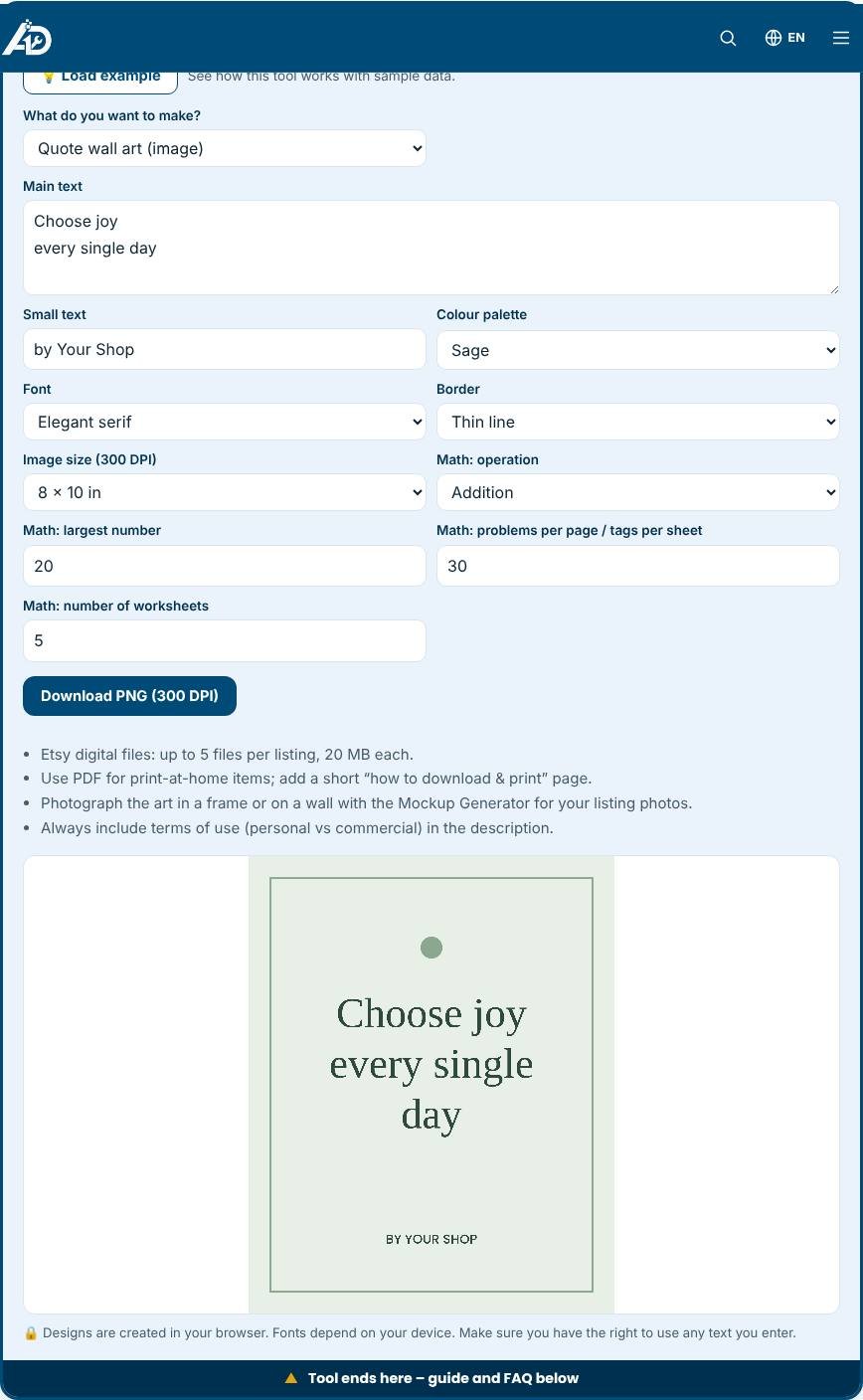
Etsy buyers search for printable wall art, kids' worksheets, party signs and gift tags every day, and these digital products can be sold repeatedly without any shipping. This free generator helps you create five kinds of products: quote wall art, welcome or event signs, listing cover images, maths worksheets with an answer key and gift tag sheets. You choose the text, colour palette, font and size, and download a high-resolution image or print a PDF. Everything is created in your browser, so there is nothing to install and no files to upload.
What you can make
- Quote wall art: centred text on a coloured background with an optional border, exported at 300 DPI in common frame sizes such as 5 by 7, 8 by 10 and 11 by 14 inches, as well as A4 and A3.
- Welcome and event signs: large lettering for weddings, parties and baby showers.
- Listing cover images: a clear thumbnail with an "Instant download" strip for your listing.
- Maths worksheets: randomly generated addition, subtraction, multiplication or mixed problems with a separate answer key.
- Gift tags and labels: a sheet of tags with a punch hole, ready to cut.
Why 300 DPI matters
Printers need enough pixels to produce a sharp result. At 300 dots per inch, an 8 by 10 inch print requires 2400 by 3000 pixels. The generator sets the canvas size automatically, so the image is crisp when customers print it at home or at a print shop. For large formats such as A3, the image is created at the same resolution to keep text sharp.
Steps to build a sellable product
- Pick a niche, such as nursery quotes, teacher gifts, wedding signs or maths practice for grade two.
- Write or choose original text. Do not use quotes that belong to someone else unless they are in the public domain or you have permission.
- Select a palette and font that fit the niche.
- Create the file in several sizes, then combine them into one download with a ZIP or a PDF.
- Create listing photos with the Mockup Generator and write the listing with the Etsy Listing Generator.
Tips for better digital products
- Make small sets, such as three coordinating prints, to raise the average order value.
- Keep text short and use generous margins so that frames do not hide the edges.
- Use a clear "how to download and print" page in the file bundle to reduce questions.
- Update your listing images seasonally, for example with holiday colours.
- Respond to buyer questions quickly. Good service leads to reviews.
Common mistakes to avoid
- Using trademarked characters, brand names or song lyrics in designs.
- Forgetting to include terms of use for personal or commercial use.
- Uploading files larger than the marketplace allows. Etsy limits the number and size of files per listing, so check the current rules.
- Selling worksheets without checking the answers. The generator creates correct answers for its problems, but always preview a sample.
Privacy and limits
Designs are drawn in your browser and are not uploaded. Fonts depend on your device, so the look may vary slightly between computers. The generator creates simple, clean layouts. If you want custom illustrations, combine your downloads with artwork you have created or licensed. Follow the rules of your marketplace, including those on AI-assisted designs and digital downloads.
Related tools
Build planners with the Digital Product Generator, compress images with the Image Compressor and promote your product with the AI Marketing Toolkit.
Who is it for?
Etsy sellers building or growing a digital download shop.
Why use it
- Listing titles, tags and descriptions in one place
- Mockups and video ideas for better listing photos
- Made for handmade, print-on-demand and digital sellers
- Free to start
Frequently asked questions
What file formats work for Etsy downloads?
PDF, PNG, JPG and ZIP are common. Keep files under Etsy’s size limits and include simple instructions.
How should I price digital products?
Check similar listings, then price for value and volume. Many printables sell between 3 and 15 USD.
Are there rules for digital products?
Yes. Etsy has policies on digital items and AI-generated content. Review them before you publish.
What resolution are the images?
They are created at 300 DPI for the chosen print size, for example 2400 by 3000 pixels for 8 by 10 inches.
Does the worksheet include answers?
Yes. The tool adds an answer key page after the worksheets.
Can I sell what I create?
You can sell designs you create, as long as the text and any added content are yours to use. Check marketplace rules for digital products.
Always follow Etsy’s current seller policies, including its rules on AI-assisted content and digital items.