
Free Invoice Generator – Create Professional Invoices Online
An invoice generator turns your client, items and prices into a professional invoice you can send right away. Fill in the form, watch the preview update, then print it or save it as a PDF.
Your files never leave your device.
How to use the Free Invoice Generator
-
1
Step 1
Add your business details and, if you like, upload your logo.
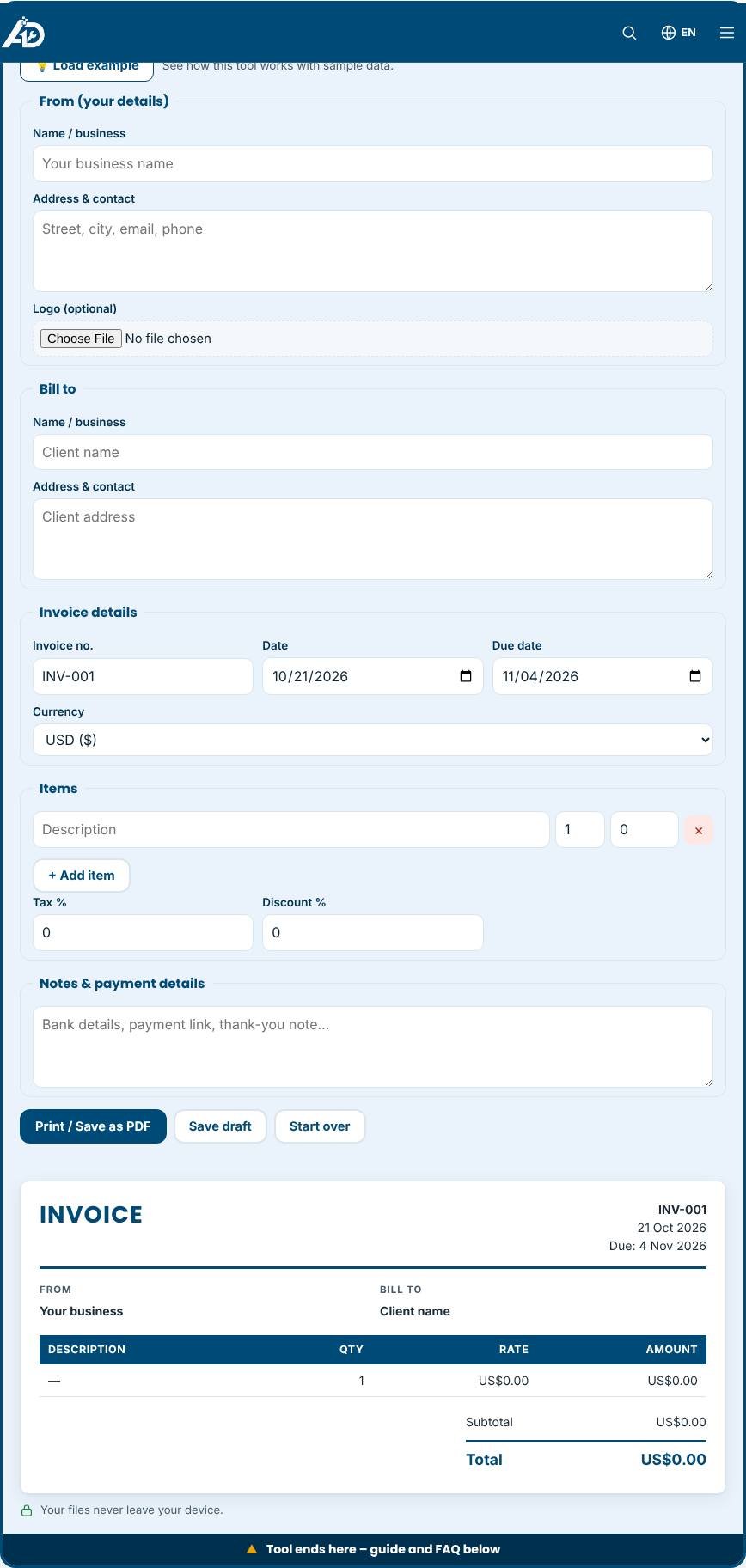
Free Invoice Generator – Step 1 -
2
Step 2
Enter your client’s name and address, the invoice number and the due date.
-
3
Step 3
Add line items with quantity and price, then set tax and discount.
-
4
Step 4
Press “Print / Save as PDF” and choose “Save as PDF” in the print window.
What is an invoice generator?
An invoice generator creates a professional bill that you can send to a client. A good invoice shows who is billing whom, what the work or goods were, the amount due, the tax, the payment deadline and how to pay. This free invoice generator lets you fill in a simple form and see the invoice update live. When you are happy, print it or save it as a PDF from your browser. There is no signup, no watermark and no limit on how many invoices you create.
What should an invoice include?
Requirements vary by country, but most invoices include the same core details. Check local rules or ask an accountant if you are unsure.
- Your name or business name, address and contact details.
- The client's name and address.
- A unique invoice number. Numbering in order, such as INV-001, INV-002, makes records easy to follow.
- The invoice date and the due date.
- A clear description of each item or service, with quantity and unit price.
- Subtotal, any discount, tax or VAT, and the total amount due.
- Payment instructions, such as bank details or a payment link, plus any late-fee terms.
- Your tax or registration number where the law requires it.
How the tool helps you work faster
Totals are calculated automatically as you type, so you never need a calculator. You can add as many line items as you like, apply a percentage discount and a tax rate, and choose a currency from the list. A logo field lets you add your branding. The "Save draft" button remembers your details in this browser, so next month you only change the invoice number, date and items. Print or save as PDF creates a clean A4 or Letter document without the website around it.
Tips for getting paid faster
- Send the invoice as soon as the work is finished or the milestone is reached.
- Set clear payment terms, for example "Due within 14 days", and make them visible.
- Offer easy ways to pay. The fewer steps between receiving and paying, the quicker the money arrives.
- Write descriptions a non-expert can understand, because a confusing invoice gets delayed.
- Follow up politely a few days before and after the due date.
Common mistakes to avoid
- Reusing an invoice number. Duplicate numbers confuse both you and your accountant.
- Forgetting tax details or the correct currency.
- Leaving out the due date, which gives clients no reason to pay on time.
- Sending an editable file when a PDF is more appropriate and cannot be changed by accident.
Privacy and limits
Everything you type stays in your browser. Nothing is uploaded, and drafts are stored only on your device. The tool does not know the tax law of your country, so enter the tax rate yourself. It does not send emails, take payments or keep a record of invoices on a server, so keep your own copies of the PDFs.
Related tools
Working as a freelancer? Try the Invoice Generator for Freelancers, work out your prices with the Rate Calculator and keep track of clients in the Free CRM.
Who is it for?
Freelancers, agencies, tutors and small businesses that need quick, tidy invoices.
Why use it
- Built for freelancers and small businesses
- Clear, printable results
- No account needed to try
- Your data stays on your device
Frequently asked questions
Is the invoice generator free?
Yes. You can create as many invoices as you like without an account.
Is my invoice data stored?
Your data stays in your browser. You can save a draft on your device and clear it at any time.
What should an invoice include?
Your details, the client’s details, a unique invoice number, the date, itemised charges, tax, the total and payment terms.
How do I save the invoice as a PDF?
Press the Print or Save as PDF button, then choose "Save as PDF" as the destination in the print window.
Can I add my company logo?
Yes. Use the optional logo field. The logo is shown on the invoice preview and in the PDF but is never uploaded.
Are the invoices legally valid?
Requirements differ by country. The layout covers the usual details, but confirm local rules for tax numbers and wording with an accountant.
Results are estimates for planning only and are not legal, tax or accounting advice. Check local rules before you rely on a figure.