
Cloud Storage Cost Calculator – Estimate Monthly and Yearly Cost
Cloud storage cost depends on how much data you store, how fast it grows and how much you transfer out. Enter your numbers and the calculator estimates monthly and yearly cost.
Loading tool…
How to use the Cloud Storage Cost Calculator
-
1
Step 1
Enter the amount of data you store today.
Cloud Storage Cost Calculator – Step 1 -
2
Step 2
Add expected monthly growth.
-
3
Step 3
Enter the price per GB and expected data transfer.
-
4
Step 4
Read monthly and 12-month estimates and compare providers.
What does cloud storage really cost?
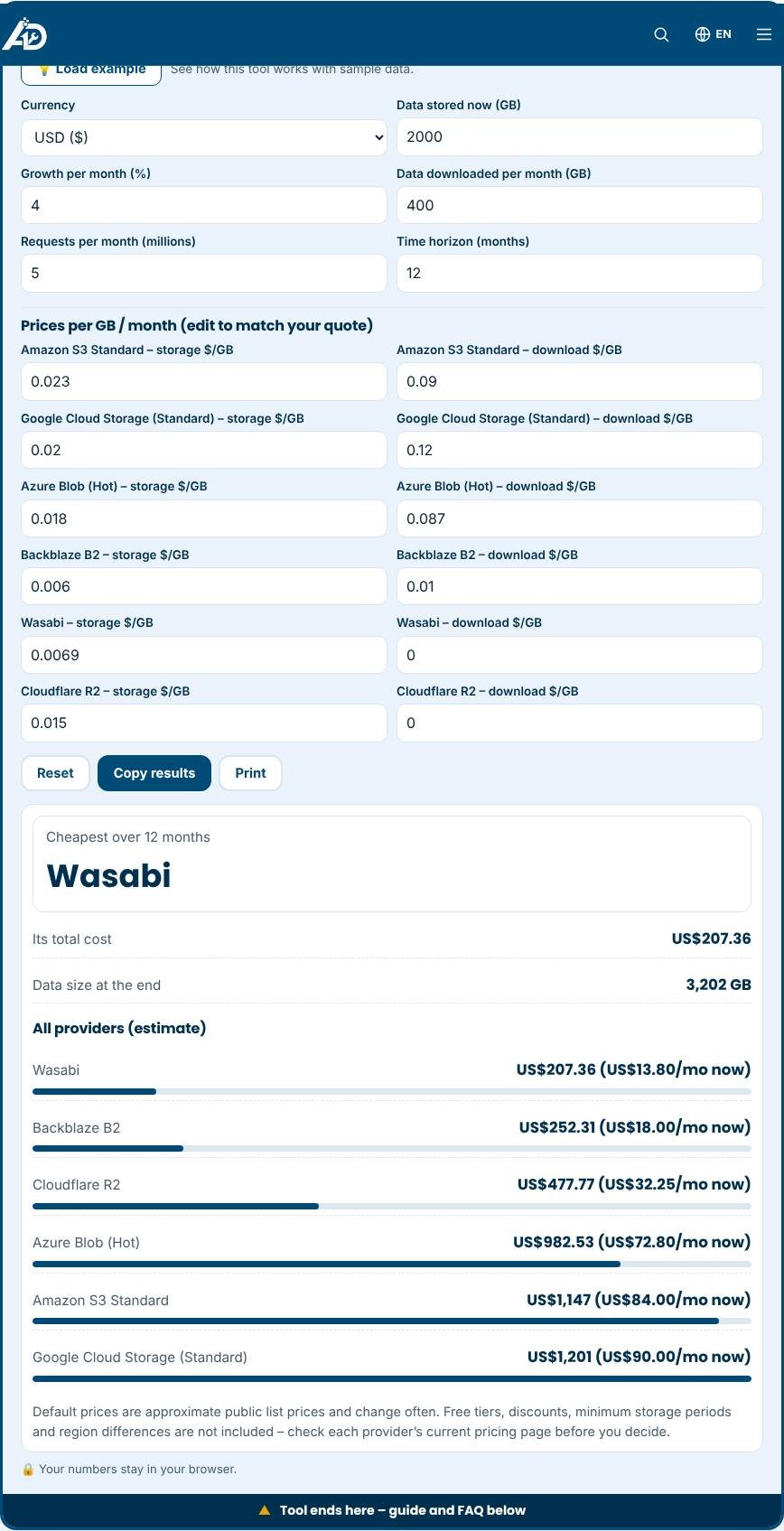
The sticker price of cloud storage, a few cents per gigabyte per month, hides the bill that arrives at the end of the month. Providers also charge for data you download, called egress, for the number of requests and sometimes for minimum storage periods or retrieval. Your data also tends to grow. This calculator estimates the total for six popular object storage services over the time horizon you choose. Enter the data you store now, monthly growth, monthly downloads, requests and the number of months. It ranks the providers and shows the monthly and total cost of each.
The cost components
- Storage: priced per gigabyte per month, with different prices for hot, cool and archive tiers.
- Egress: the charge for moving data out of the cloud to the internet. For websites, media and backups restored often, egress can exceed the storage cost.
- Requests: many providers charge per thousand or million read and write operations.
- Minimums and early deletion: colder storage tiers can have minimum retention periods and retrieval fees.
- Free tiers and discounts: small allowances, committed use and volume pricing can lower the price.
How to use the comparison
Start with your real numbers. Check your current storage in gigabytes and estimate monthly downloads from your analytics or provider dashboard. Then adjust growth to reflect how quickly you add files. Look at the total over twelve or twenty-four months, not only today's cost, because growth changes the ranking. Providers that offer free or very low egress, such as some newer services, often win when you serve a lot of data. Established clouds may be better when you need tight integration with other services, compliance features or global regions.
Choosing more than price
Price matters, but so do reliability, durability guarantees, performance, regions, security features, support and ease of use. Consider how the files are accessed. A backup archive that is written once and rarely read has very different needs from images served to a global audience. Check what happens if you need to leave: some services make export expensive. Also consider data protection laws that may require storing data in particular regions.
Tips for reducing cloud costs
- Delete files you no longer need and set lifecycle rules to remove temporary data automatically.
- Move rarely used data to cheaper storage classes.
- Compress images and videos before uploading. Smaller files cost less to store and deliver.
- Use a content delivery network and caching to reduce repeated downloads.
- Monitor spending with alerts, so a runaway job does not create a large bill.
- Compare quotes again each year, as prices change.
Common mistakes to avoid
- Forgetting egress, which is the most common surprise.
- Assuming a free tier is permanent or large enough for production use.
- Ignoring growth in the plan.
- Choosing the cheapest option without considering reliability and support.
Privacy and limits
Numbers stay in your browser. The default prices are approximate public list prices that change often, so edit them with the figures from your provider's pricing page or a written quote. The estimate does not include taxes, support plans, bandwidth to other cloud services, free allowances, data transfer between regions or one-time migration costs.
Related tools
Shrink your files first with the Image Compressor, test your connection with the Internet Speed Test and scan your site with the Website Security Scanner.
Who is it for?
Developers, IT managers and small businesses planning backups or file storage.
Why use it
- Quick checks with clear next steps
- Passwords are never sent anywhere
- Easy explanations, no jargon
- Free and mobile friendly
Frequently asked questions
Why are my real bills higher?
Transfer fees, request charges, retrieval fees and minimum storage periods can add to the base price per GB.
How can I reduce storage cost?
Delete duplicates, compress files and move rarely used data to a cheaper archive tier.
Which price should I enter?
Use the current price listed by your provider for your region and storage class.
Are the provider prices up to date?
They are approximate list prices and may change. Edit the price fields to match your current quote.
What is egress?
Egress is the cost of transferring data out of the provider to the internet. It is billed per gigabyte and is often the largest hidden cost.
Does the calculator include free tiers?
No. It uses the plain per-unit prices so providers can be compared fairly. Subtract any free allowance you expect to use.
Only scan websites you own or have permission to test. Results are guidance, not a guarantee of security.